Stock Health Score: from a long form to one swipe at a time
Business owners recorded their sales, but far fewer updated their stock. The only way to do it was a long item form. I came up with a card-swipe flow where each business picks what it tracks, then updates item by item, one detail per card. My prototype went to production.
- My role
- Product + design. Spotted the pattern, came up with the concept, built the prototype.
- Shipped as
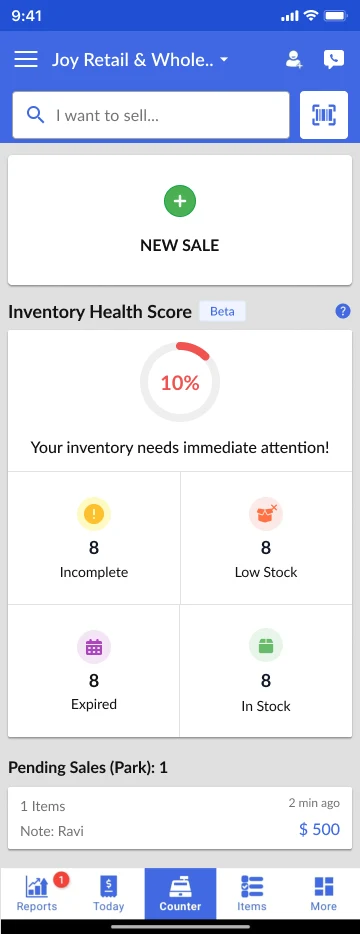
- Inventory Health Score card on the home screen, Android
- Metric
- Users updating inventory at least every 14 days
- Result
- ~30% → ~40–45%within 2 months of launch
- How measured
- Share of users updating stock at least every 14 days, tracked for 2 months after launch
The pattern
Sales got recorded. Stock didn’t.
Most businesses used Zobaze to bill. Far fewer kept their stock up to date: only about 30% updated inventory at least once every 14 days. Without stock data, low-stock and expiry alerts have nothing to work with.
The reason was the way updating worked. Every change went through the product form: a legacy form that shows every field to every business, whether or not they use it. A business that doesn't track expiry dates still sees the expiry field. It felt like a lot of work, and it killed the motivation to start.
Updating ten items meant running this loop ten times:
The share of users who update inventory at least every 14 days. It shows whether stock tracking became a regular habit.
The idea
Ask only for what this business needs, one detail at a time
The question I kept asking was how to make this simple. Two ideas came out of it, and I put both into a swipeable prototype:
Every field for every business
The form decides what matters. Most fields are noise for most businesses.
The business decides
Swipe right to keep a detail, left to skip it. Only kept details count in the score.
One item, one long form
Open, find, enter, save, go back, pick the next item.
One detail per card
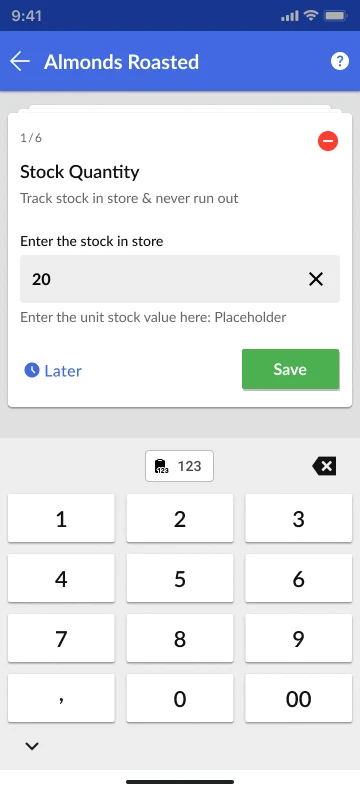
Swipe item by item. Enter the number, save, and the next card is already there.
The flow
From the score to a saved update in a few taps
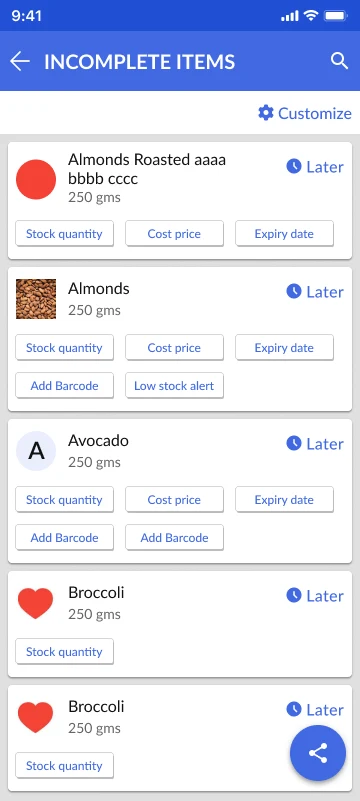
The three screens below are the shipped design. The setup step, the next card and the updated score are recreated here to show the full flow.
Swipe right to keep a detail, left to skip it. Your score only counts what you keep.
Expiry date
Know which items are about to expire.
Cost price
Know your profit on every sale
Save, and the next card slides in
Getting healthier
Sample data
When stock comes in, business owners swipe through items the same way, or type the quantity straight in. No form.
Result
More businesses kept their stock up to date
The habit grew from recording sales to tracking stock as well. Business owners save time because they only touch the details they track, and never open a form to do it.